

- Injective announced that INJ was available in Phantom on September 18, 2026; Phantom’s token page lists Injective (INJ) on the Solana network.
- This is access to the Solana-based INJ token, not a native Injective-chain balance.
- A separate Injective guide shows how Phantom can sign a Solana transaction for a SOL-to-INJ swap routed through deBridge to an Injective address.
- The two paths have different assets, networks, and destination wallets. Check the network and token mint before transacting.
Injective’s INJ token is available through Phantom as a Solana-network asset. The wallet listing gives Solana users a way to view and trade that token through Phantom-supported routes, while Injective’s launch materials also describe trading INJ across Solana apps and wallets. The distinction that matters most: Solana-based INJ and native INJ on Injective are balances on different networks.
What does Phantom’s INJ integration actually add?
Phantom users can access the Solana version of INJ in the wallet. Injective’s September 18 announcement described the asset as available and verified on Phantom, while Phantom’s token page identifies its network as Solana.
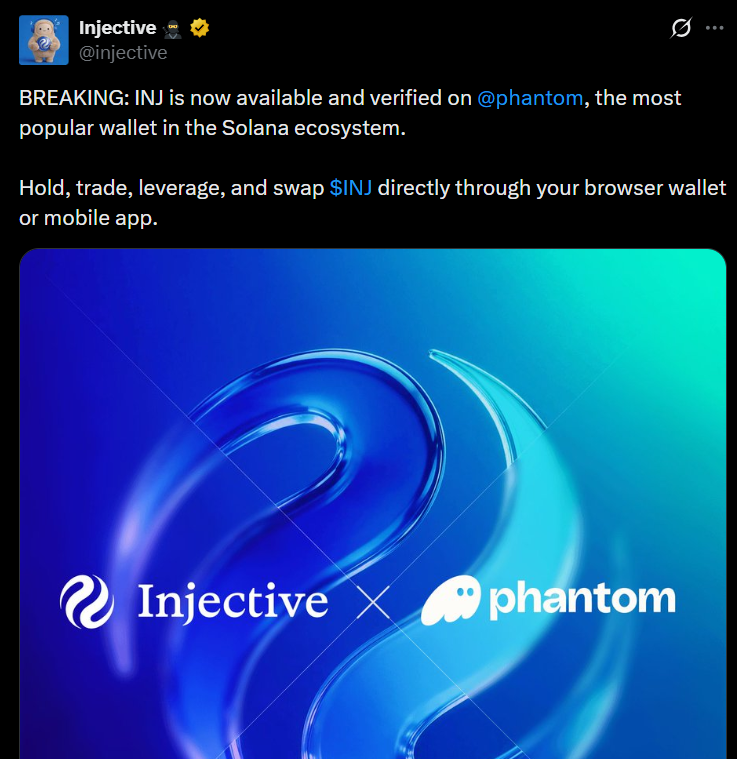 Source: Official announcement
Injective named Sunrise as the route bringing an official Solana token version into that ecosystem, with Raydium and StonkFun identified as launch partners. It's announcement said initial INJ liquidity was on Raydium and that StonkFun supported INJ as a token-pairing option.
How is Solana-based INJ different from native Injective INJ?
The network determines where the balance exists and which applications can use it. A token shown under Solana in Phantom is not automatically a native Injective-chain balance.
| Path or asset | Network and asset | What the user does | What to verify |
|---|---|---|---|
| INJ shown in Phantom | Solana; the Solana INJ token | View or trade through Phantom-supported Solana routes | Solana network and the official mint published by Injective |
| Native INJ on Injective | Injective network; native INJ balance | Use an Injective-compatible wallet and supported Injective applications | Destination network and the Injective address controlled by the recipient |
| SOL-to-Injective route | SOL on Solana is swapped for INJ delivered on Injective | Phantom signs the Solana-side transaction; deBridge executes the cross-chain swap | The live quote, fees, destination address and fulfillment status |
Check the mint, not just the ticker. Injective publishes this Solana mint for INJ:
1NJMqVM4PadjuzYmeB7zV7q7DV8oB3ExaQCd9x6KsLz. Confirm it against the
official Injective announcement before interacting with a token that uses the INJ symbol.
What can users do with INJ across Solana?
In a market pair, INJ is the quote asset used to price and trade another token. Injective’s StonkFun tutorial walks through selecting Sunrise and then INJ as the quote token; it also cautions that the Sunrise INJ balance is on Solana and differs from native INJ on Injective. That makes the integration relevant to more than simply adding a ticker to a wallet: the Solana asset can participate in Solana-based markets that explicitly support it.
- Raydium: Injective identified Raydium as the venue for initial INJ liquidity on Solana.
- StonkFun: Injective’s tutorial shows INJ as a quote-token option for creating and finding supported pairs.
- Phantom: Injective named Phantom as a wallet for accessing INJ on Solana; Phantom’s listing page labels the asset’s network as Solana.
Key distinction: Seeing INJ in Phantom does not by itself mean that the wallet has switched to Injective, or that a Solana balance can be sent to an Injective address as if both networks were the same.
How do you bridge from Solana to Injective using Phantom?
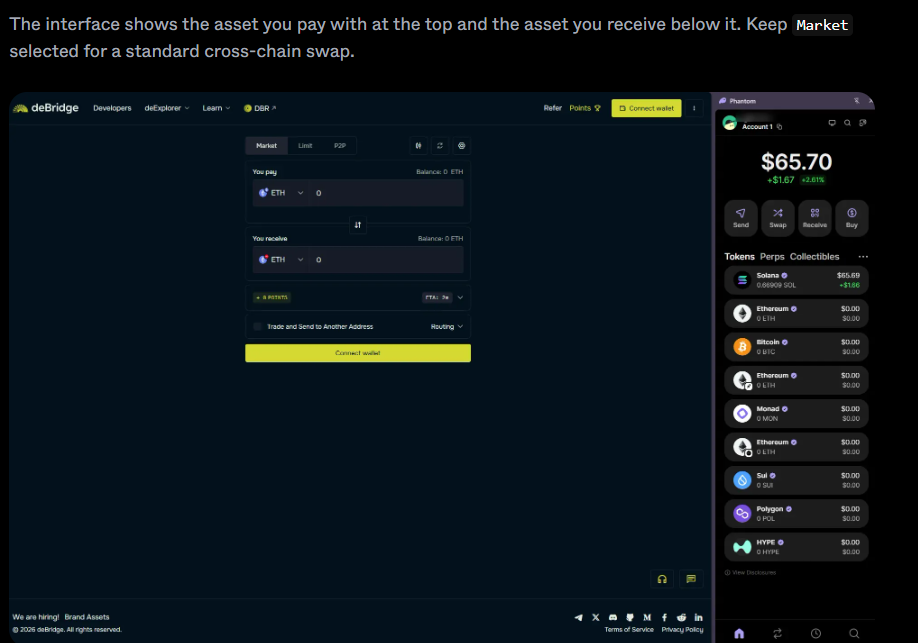
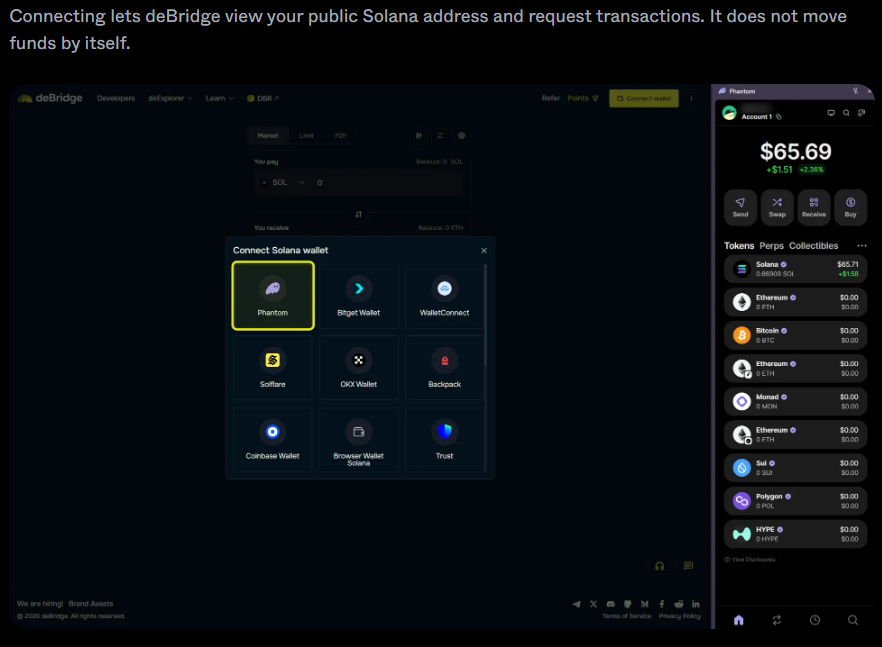
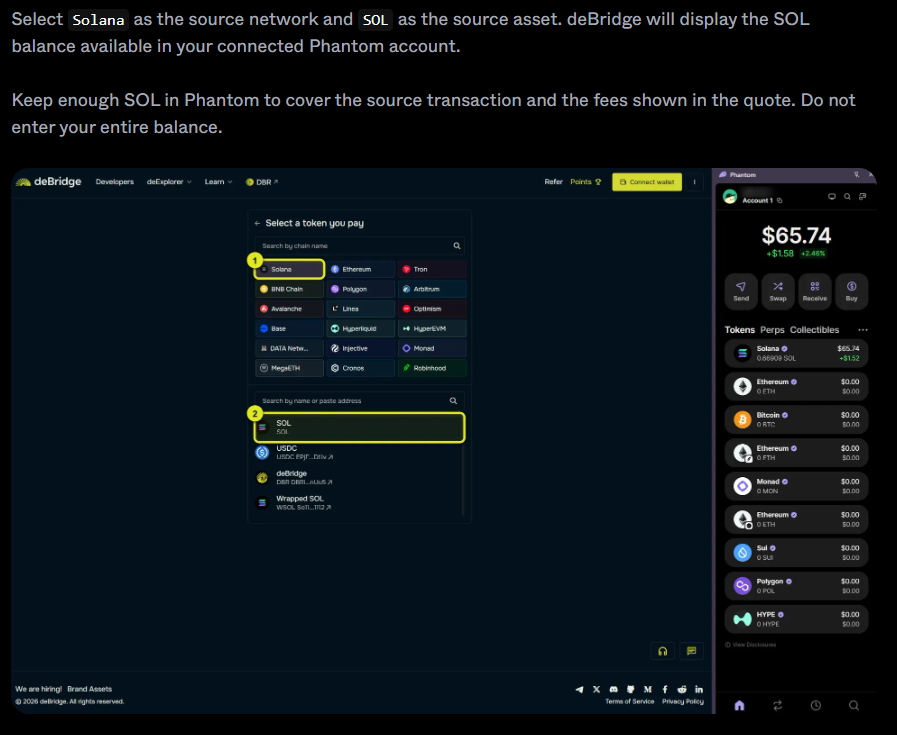
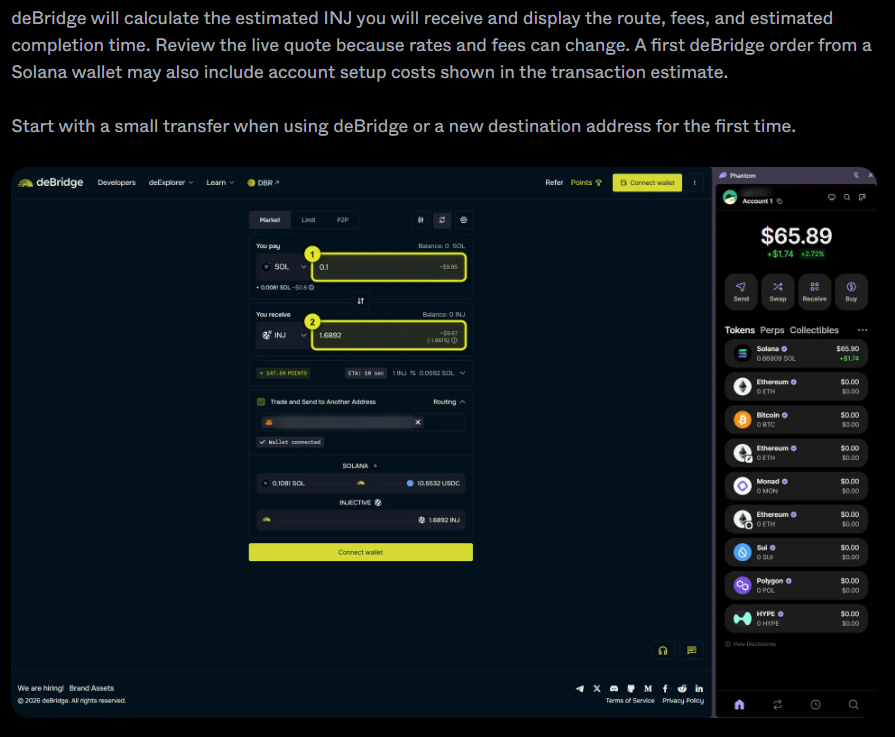
Injective’s guide uses Phantom to sign a Solana transaction and deBridge to swap SOL on Solana into INJ delivered to an Injective destination address. This is a separate route from holding or trading Solana-based INJ inside Phantom.
- Open the route: Use the deBridge app linked from Injective’s guide. Confirm the domain is
app.debridge.combefore connecting a wallet. - Connect Phantom: Select the Phantom account that holds SOL on Solana. Connecting alone does not move funds; review any transaction request separately.
- Choose the assets and networks: Set Solana and SOL as the source, then Injective and INJ as the destination. This route exchanges SOL for INJ; it does not deliver wrapped SOL.
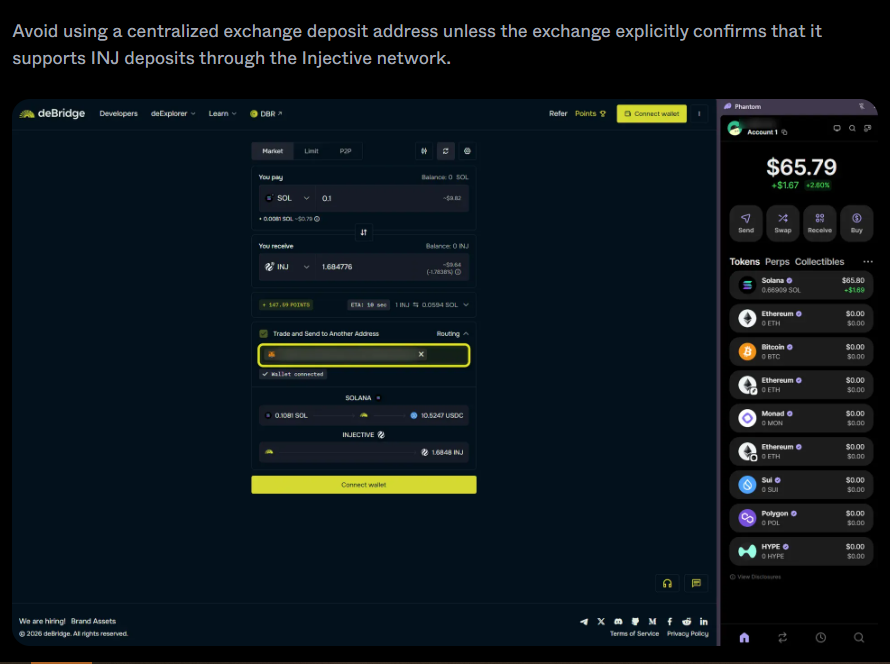
- Enter the Injective recipient: The guide says the current deBridge route expects an Injective hexadecimal address beginning with
0x. Do not enter the Phantom Solana address or an address beginning withinjinto that route. - Review and sign: Check the destination, estimated INJ output, exchange rate and total fees. Keep enough SOL for the Solana transaction fee and the costs shown in the quote. Phantom signs the Solana transaction.
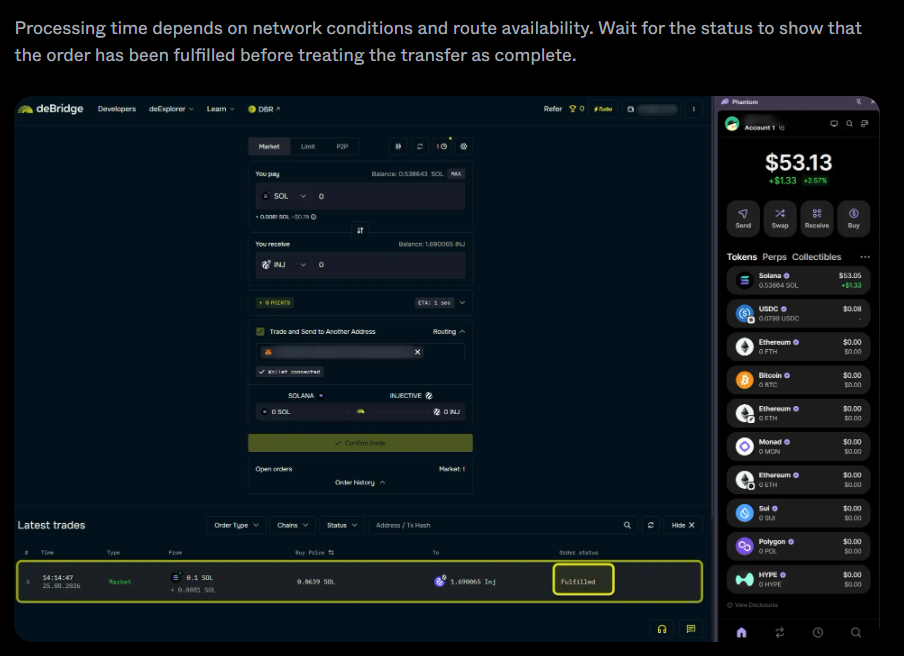
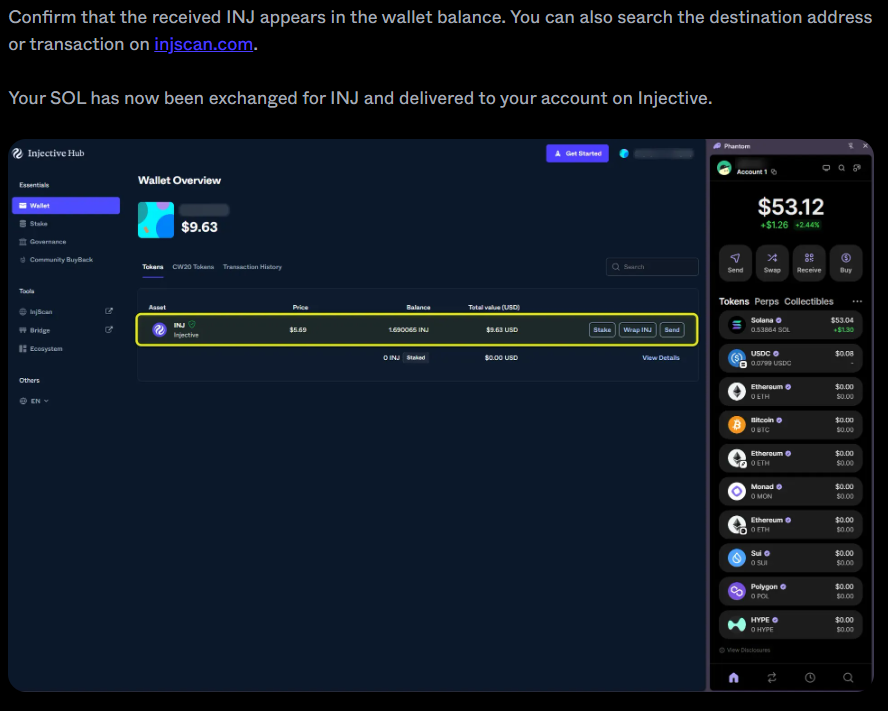
- Track and verify: Wait for deBridge to mark the order fulfilled, then check the receiving balance in the Injective wallet or inspect the destination using Injective’s explorer.
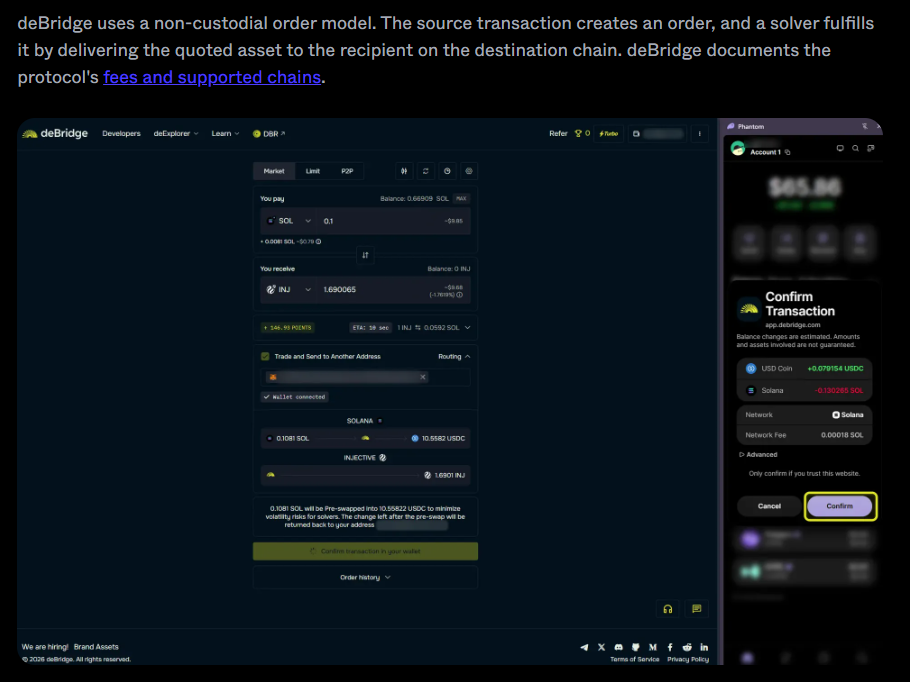
Never share your recovery phrase or private key. Injective’s guide says wallet connection and transaction approval should happen inside Phantom. Review the network, amount, fee and recipient address before signing; fees, quotes and processing estimates can change.
What should users verify before signing?
Confirm whether the transaction is staying on Solana or moving value to Injective, and verify the exact asset, mint, address and live fees shown in the wallet and route.
- Check that the token network shown is the one you intend to use.
- For Solana INJ, compare the mint with the address Injective publishes.
- For the SOL-to-Injective deBridge flow, check that the source is SOL on Solana and the destination is INJ on Injective.
- Use an Injective destination address that you control; the documented route currently asks for the
0xformat. - Review the live output estimate, network fee and other route fees before approving the transaction.
- Wait for an order-completed status and confirm the destination balance; do not assume the transfer finished just because the source transaction was signed.
What should readers watch next?
The immediate practical question is which Solana applications and wallet actions support the listed asset at the time of use. Injective’s September launch article mentioned additional integrations as future possibilities without giving a fixed rollout schedule.
For readers, the distinction between wallet access and chain access is more useful than the headline alone. Phantom lists INJ on Solana; the bridge tutorial describes a separate SOL-to-INJ route that ends on Injective. Before using either path, check the current wallet screen and the linked protocol documentation rather than assuming that every feature or market is available everywhere.
Frequently Asked Questions (FAQs)
Q: Does Phantom support native Injective balances? A: The Phantom token page identifies the listed INJ asset as being on Solana. Injective’s bridge guide uses Phantom on the Solana side and a separate Injective destination address for the SOL-to-INJ route.
Q: Is Solana INJ the same as native INJ? A: No. They are associated with different networks. Injective’s own StonkFun guide explicitly distinguishes Sunrise INJ on Solana from a native INJ balance on Injective.
Q: Does the Phantom integration automatically bridge SOL to Injective? A: No. The documented SOL-to-Injective route uses deBridge for the cross-chain swap. Phantom signs the Solana transaction; the recipient is an Injective address.
Q: Which address should be entered in the documented bridge route?
A: Injective’s guide says the current deBridge route expects the recipient in hexadecimal format beginning with 0x. It warns not to use the Phantom Solana address or the inj format in that field.
Disclaimer: The information provided on this blog is for informational and educational purposes only and does not constitute financial, investment, legal, or tax advice. Cryptocurrency investments are highly volatile and carry a high risk of financial loss.